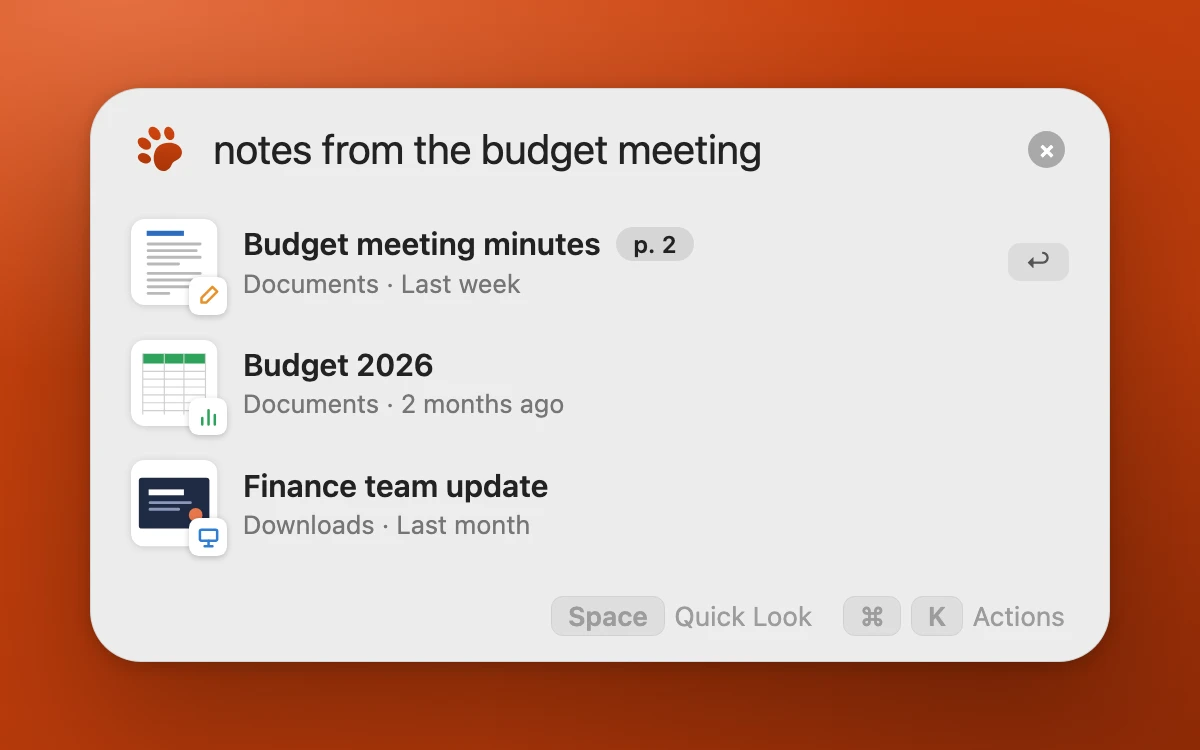
Spotlight is a good start, but it isn’t the only way to search. These are the best Spotlight alternatives for Mac, each built for a different job.
By Alchemy · Updated
What Spotlight does on your Mac today
Spotlight is the search built into macOS. Press ⌘ Space to open apps and find files, messages and settings, work out sums, convert units and currencies, look up definitions, run quick actions and browse your clipboard history. On macOS 27 it can also pass questions to Siri AI, which is in beta and needs an Apple Intelligence Mac. That covers a lot. People usually look further for one of three reasons: better results when they can’t remember a filename, more automation from the keyboard or tighter control over search criteria.
How to choose a replacement
Start with your memory. If you recall what a file says or shows, look for a Spotlight replacement for Mac that searches by meaning. If you recall its kind, date or folder, precise filters matter more.
Count the actions you repeat. Opening apps is common ground. Custom workflows and integrations are where launchers differ, often in paid tiers.
Check the requirements and price. Your macOS version, your chip and the choice between a subscription and a one-time purchase all affect which app fits.
How we compared these apps
We compared each app’s purpose, file search, requirements and price using its maker’s published information, checked in November 2026.
Shepherd is the one to choose when finding files is the problem. Describe what you remember, and it searches what your documents say, what your images show and what happens in your videos, then takes you to the matching passage in a long file. Copies of a document group together with the newest on top. Everyday jobs stay close too, from opening apps to sums, conversions and time zones. In our testing on macOS 27, Shepherd found the right file faster and more accurately than Spotlight with Siri AI (beta). It runs on your Mac and works offline after a one-time model download. See Shepherd vs Spotlight for the full comparison, or explore its AI file search for Mac.
$14.99 once for one Mac, with a 14-day refund.
What you can do
Search by meaning, down to the passage.
Find text and visuals in images and videos.
Works offline, with no account or analytics.
One payment with free updates.
What to consider
Needs Apple silicon and macOS 14 or later.
Built for finding and opening, not scripted workflows.
Raycast
Running commands and extensions
Raycast turns the keyboard into a control centre. It opens apps, runs commands, manages windows, keeps clipboard history and connects to a large library of extensions. File search matches names by default, and you can turn on Content Search, which relies on Spotlight’s index. Asking for files in plain language uses AI Extensions on the paid Pro plan. Choose Raycast if commands and integrations matter more to you than finding documents from memory.
Free plan; Pro is $10 a month or $96 a year.
What you can do
Free plan with clipboard history and window management.
Large library of extensions.
Optional search inside files.
What to consider
Plain-language file search needs Pro.
Content Search depends on Spotlight.
Needs Apple silicon and macOS Tahoe.
Alfred
Building shortcuts for repeated tasks
Alfred is a launcher you shape around your own habits. The free core opens apps and finds files, and its “in” keyword searches inside file contents. The paid Powerpack adds workflows that chain actions to a keyword or hotkey, along with clipboard history and text expansion. You can build a workflow yourself or import one that someone else has shared. Choose Alfred if you’re happy to spend setup time in exchange for shortcuts that repeat your routine exactly.
Free; Powerpack is a one-time purchase from £40.
What you can do
Free core that searches inside files.
Custom workflows with Powerpack.
One-time Powerpack purchase.
What to consider
Workflows and clipboard history need Powerpack.
Custom workflows take time to set up.
HoudahSpot
Combining detailed search criteria
HoudahSpot is a dedicated file search tool for people who know a few facts about what they’re after. Combine criteria such as name, kind, date, folder and text content, then preview results and matching text before opening anything. HoudahSpot builds on Spotlight’s index, so it can only find what that index covers. Choose it if Spotlight’s filters feel too loose and you’re comfortable building a precise query.
Paid license, with a free demo mode.
What you can do
Combine many file criteria.
Preview files and matching text.
Free demo mode before buying.
What to consider
Depends on Spotlight indexing.
Works best when you know file properties.
What switching to Shepherd looks like
Moving your search over takes a few minutes. Install Shepherd, choose the folders it should read and let it download its AI model once. Turn off Spotlight’s shortcut, then give Shepherd ⌘ Space so the keys you already use open the new search.
From there, type what you remember. A subject, a detail from inside, a date such as “last week” or a filename all work in the same box. Press Space to preview a result and Return to open it. Shepherd for Mac costs $14.99 once, with free updates and a 14-day refund, and your files never leave your computer.
Test any alternative the same way
A feature list only tells you so much. Pick three files you struggled to find recently and write down what you remembered about each one at the time. It might be a client’s name, the gist of a paragraph, the colours in an image or the week you saved it.
Search for each file in every app you’re considering, using only those clues. Note which app showed the right file first, how many results you had to open and whether you reached the part you needed. Include one file with an unhelpful name, since that’s where a Spotlight replacement for Mac has to prove itself.
Then try the actions you repeat daily, such as opening an app or converting a currency. The app that handles both with the fewest steps is the one you’ll keep using.
Shepherd, if you remember what a file is about or what it shows. HoudahSpot suits you if you remember exact properties, such as kind, date or folder. Choose by the clue you usually have.
Can Spotlight search inside files?
Yes. Spotlight searches the text macOS has indexed and offers filters such as file kind. The apps here add search by meaning, deeper automation or more detailed criteria.
Is there a one-time purchase option?
Shepherd is $14.99, paid once, and Alfred’s Powerpack is also a one-time purchase. Raycast’s paid plans are subscriptions. HoudahSpot sells a paid license and offers a free demo mode.
Does Shepherd work without the internet?
Yes. After a one-time download of its AI model, about 1 GB, Shepherd searches your Mac offline. Your files and searches stay on the computer, with no account or analytics.
How do I give another app ⌘ Space?
Turn off Spotlight’s shortcut in System Settings under Keyboard, Keyboard Shortcuts, then Spotlight. Then set ⌘ Space in your new app. We recommend it for Shepherd, and any other shortcut works too.
Which Macs do these alternatives need?
Shepherd needs Apple silicon and macOS 14 or later. The current Raycast needs Apple silicon and macOS Tahoe. Alfred runs on macOS 12 or later, and HoudahSpot on macOS 10.14 or later.